How to unlock your Samsung refrigerator control panel

Unlocking your Samsung refrigerator control panel is essential to regain full access to its features. This guide covers various lock functions, including Control Lock, Child Lock and Dispenser Lock, ensuring you can effortlessly manage your fridge settings and avoid unintentional changes. Depending on your model, your refrigerator will typically use only one of these options, so you may only need one set of steps.
Note: The information provided is specific to refrigerators sold in Canada; settings may vary for appliances sold in other countries.
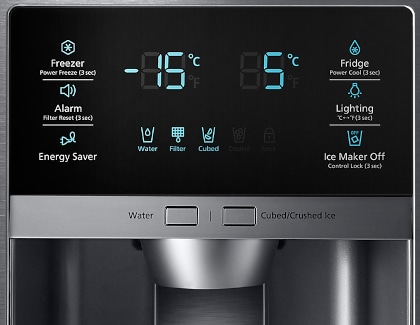
Automatic Control Lock: This feature automatically locks control panels located inside the refrigerator or on the top of a door after 1 minute of inactivity. To unlock it, touch and hold the Door Alarm button for about 3 seconds until you hear a chime.


Dispenser Lock: On some models, the dispenser can be locked using a physical switch located near the water and ice dispenser. Slide the switch to the Unlock position to enable the dispenser. Other parts of the control panel will continue to function normally. Refer to your model's user manual for specific instructions.


Child Lock (Control Lock): On models with a water and ice dispenser, some refrigerators feature a child lock (control lock) that locks both the control panel and the dispenser. These controls are typically located on the outside of the refrigerator, near the dispenser. To unlock, press and hold Ice Maker Off for about 3 seconds until you hear a chime.

On Family Hub refrigerators, you can unlock the dispenser from the screen.

- Tap Apps, then Fridge Manager, then Fridge Settings.
- Tap Lock next to Dispenser Lock to unlock it.
- If Unlock is displayed next to Dispenser Lock, the dispenser is already unlocked.


Thank you for your feedback!
Please answer all questions.
RC01_Static Content : Hide call number function