Where can I check IMEI, Model name & Serial number for Samsung mobile
इस लेख को हिंदी में देखने के लिए, यहाँ क्लिक करें

All mobile devices have a unique identity that is made up of an IMEI number, serial number and model name. Depending on your device model, there are a few different ways to find out this information. Read on to find out how to check the IMEI, model name and serial number of your mobile device.
Note
- Available screens and settings may vary by network service provider, software version, and phone model.
- Images are simulated.
Method 1. On the Phone (Settings)


Step 1. Swipe down access your Quick Settings -> Settings


Step 2.Tap on About phone


Step 3. The Model Name, Serial number and IMEI will be displayed
Method 2. Using Dialer Pad (IMEI and Serial number only)


Step 1. Dial *#06#


Step 2. The screen displayed IMEI & S/N.
Note: This only works when supported by your network service provider.
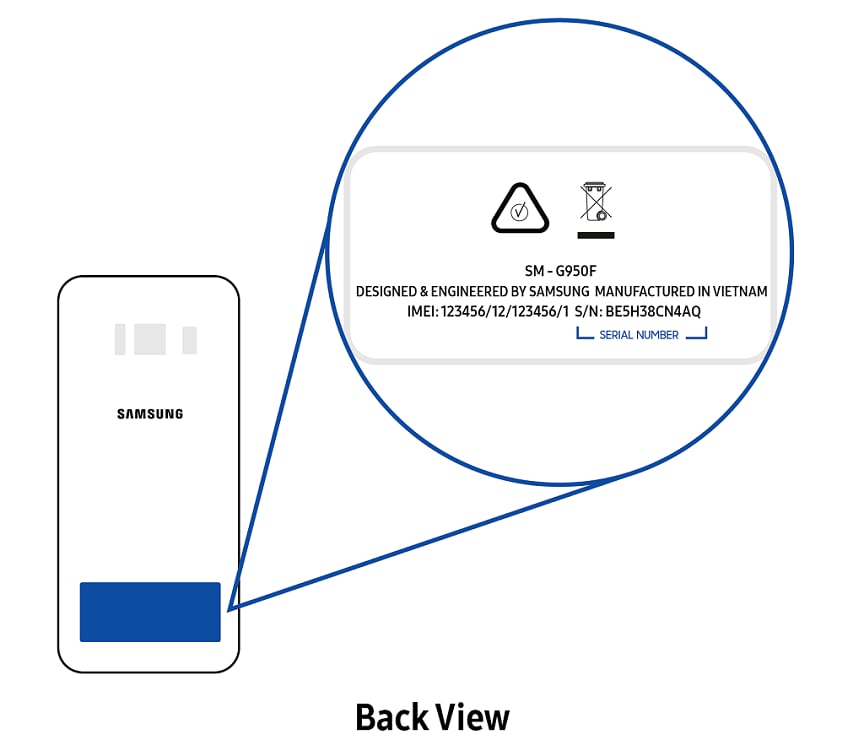
Method 3. On the Back of the Phone
The Model name, Serial number and IMEI are printed on the sticker at the back of your device.
Method 4. Samsung Members
If you have a Samsung account and the Samsung Members app installed, you can view the model name, IMEI and serial number. To find this, tap the Support tab in the app, and then tap your device’s name at the top.

Method 5. Original Packaging or Bill
- Check the original box sticker near barcode.
- Check your purchase receipt or invoice.
Note: Product Information may vary depending on the sales partner.
Looking for a different product? Find out how to locate the serial number and model number for other Samsung products:

Thank you for your feedback!
Please answer all questions.
Contact Info
Digital Service Center
![DSC icon image]()
![DSC icon image]()



Scan to access
WhatsApp
![WhatsApp image icon]()
![WhatsApp image icon]()


Languages offered : English/ हिन्दी/ Indian Regional Languages
Available 24 Hours / 7 days
WhatsApp@ 1-800-5-726-7864

Scan to access


Remote Service
![Image of RM icon]()
![Image of RM icon]()


CEO Office
![Image of CEO icon]()
![Image of CEO icon]()


Phone Support (India)
![image of phone dialer]()
![image of phone dialer]()


Phone Support (Bangladesh, Sri Lanka, Nepal)
![Image of caller icon]()
![Image of caller icon]()
RC01_Static Content : This text is only displayed on the editor page